Formfacade 表單在提交時重新導向到 Google Forms 頁面,該如何修正?
您把表單放在網站上,是為了讓訪客留在那裡,但他們提交後卻跳到 Google Forms 頁面,有時還出現錯誤或登入訊息。這是因為您的 Google Form 設定了將回應副本寄給填答者,或限制每人 1 份回應,而這些都必須由 Google 自己完成。要解決這個問題,請在您的 Google Form 中關閉這兩項設定。
如果您為所有表單提交啟用了「Send responders a copy of their response」(Always),或將表單限制為每位使用者 1 個回應,Formfacade 表單在提交時就會重新導向到 Google Forms 頁面。請關閉這些選項,讓填寫者提交後仍停留在您的頁面上。您可以使用我們的 Formfacade - Email notification 外掛程式,將回應收據寄給填答者,並將電子郵件通知寄給協作者。
重新導向到 Google Forms 頁面並顯示「There was a problem submitting your response.」訊息
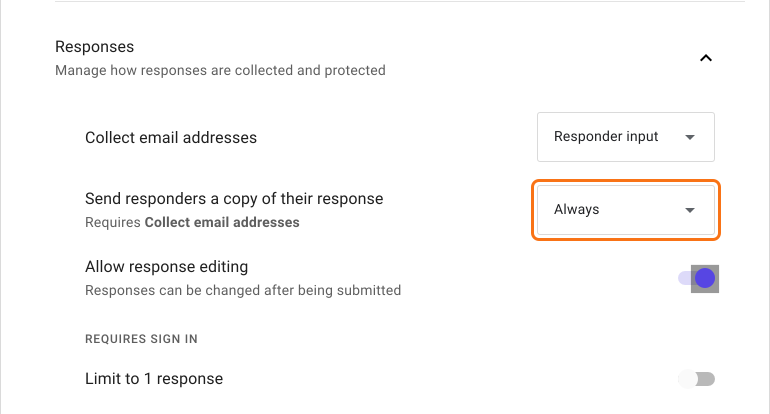
如果您對所有表單提交都啟用了「Send responders a copy of their response」(Always),Formfacade 表單就會重新導向到 Google Forms 頁面,並顯示錯誤訊息「There was a problem submitting your response. Try again.」
要解決這個問題,請在 Google Forms 中開啟您的表單,點選 Settings 分頁。選擇 Responses,然後將「Send responders a copy of their response」設為 Off。
如何傳送回應收據?
您可以使用我們適用於 Google Forms 的 Formfacade - Email notification 外掛程式。請參考以下說明文章:
重新導向到 Google Forms 頁面並顯示「To fill out this form, you must be signed in.」訊息
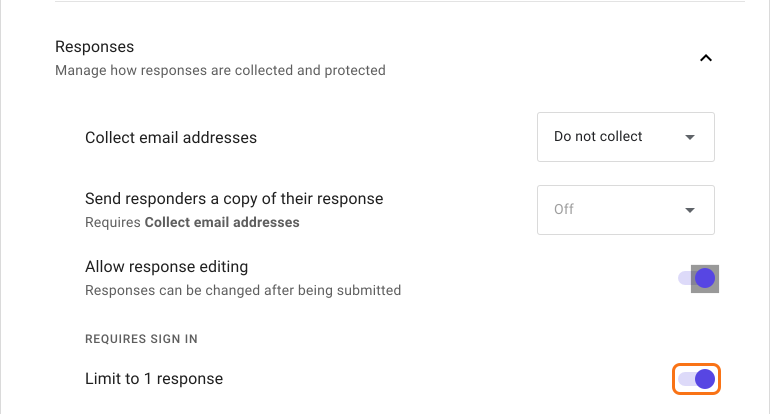
如果您將表單提交限制為每位使用者 1 次回應,Formfacade 表單就會重新導向到 Google Forms 頁面,並顯示「Sign in to continue. To fill out this form, you must be signed in.」訊息。如果使用者已在瀏覽器中登入 Gmail 帳戶,則會直接前往 Google Forms 頁面,不顯示任何訊息。
要解決這個問題,請在 Google Forms 中開啟您的表單,點選 Settings 分頁。選擇 Responses,然後關閉「Limit to 1 response」。
摘要
如果您的 Formfacade 表單在提交時跳到 Google Forms 頁面,原因是您 Google Form 中的兩個設定之一。請關閉這些設定,改用 Formfacade - Email notification 外掛程式寄送回應收據和電子郵件通知。如有任何問題,請寫信給支援團隊。
最後更新: