頻率量表
要了解大家多常使用您的每項產品或執行某項工作,每個項目都需要相同的答案量表:Never、Rarely、Sometimes、Often、Always。Google Forms 沒有頻率問題,而每個項目各用一題選擇題,會讓表單又長又累人。單選方格則用一張表搞定,項目為列、量表為欄。這裡您會在 Formfacade 表單中建立它,並要求每列都必須回答,讓每個項目都不會被跳過。
建立您的表單,並依照下列步驟操作。
如何建立頻率量表問題?
- 點選建立您的表單,為表單命名,點選 Build form,再點選 Proceed。
- 點選「Edit」分頁

Google Forms 沒有專門的頻率量表問題類型。您可以使用啟用 require a response in each row 選項的單選方格來建立頻率量表。
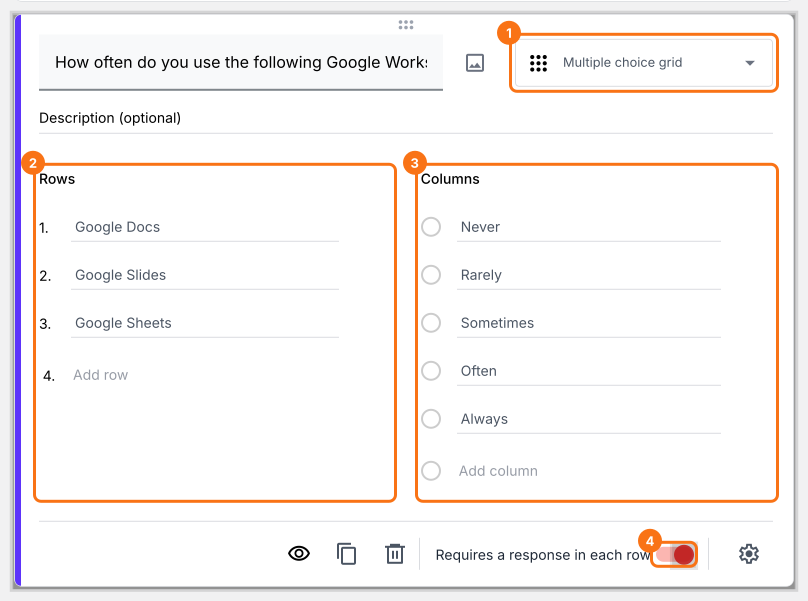
- 點選右側工具列中的 + 圖示 (Add field),然後輸入您的問題
- 在問題類型清單中選取 Multiple choice grid
- 在 Rows 中加入敘述或問題
- 在 Columns 中加入頻率量表作為答案選項
- 如下所示啟用 Requires a response in each row 切換按鈕
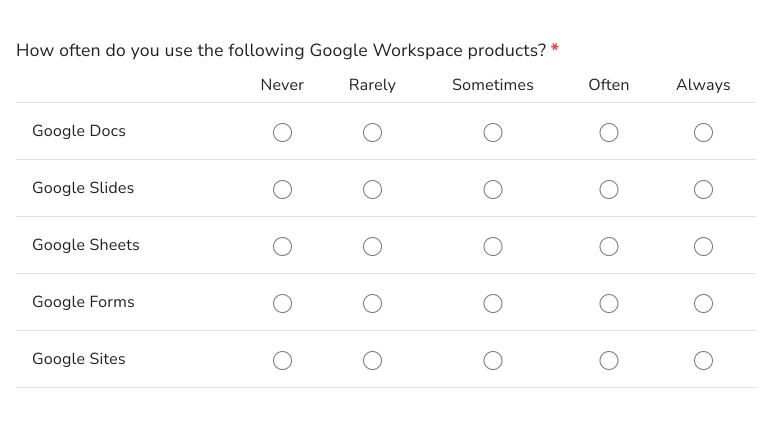
使用者看到的畫面
頻率量表問題可以用來了解使用者多常使用某項產品或執行某個動作。您可以用單選方格問題類型建立頻率量表問題。以下是範例。
摘要
如果您想衡量使用者做某件事的頻率,Google Forms 沒有頻率量表問題。使用 Formfacade 的單選方格,您可以把項目加成列、把頻率量表加成欄,並要求每列都必須回答。建立您的表單,然後完成上述步驟。
最後更新: